

self check-in your attendance for
ONLINE MEETINGS
CHURCH IS A COMMUNITY
As you're already aware, all Antioch Gospel Church meetings are being held online while the current Coronavirus outbreak restrictions are in place. For many of us we might be seeing each other less for the time being but that doesn't mean that we're no longer a community.
As a church we think it's important to know that you are here with us, worshipping together with the family so that we can keep reaching out to those who call Antioch Gospel Church their 'home'.

Introducing
SELF
CHECK-INS
It's so much easier for our team to embrace you as a member of our church community if we know that you joined us this weekend. We highly encourage you download 'Church Center' and begin using our convenient self-check in service to log your attendance and keep your details up-to-date.
HOW DO I SELF-CHECK IN ATTENDANCE?
LOGIN or CREATE A PROFILE
If you've already attended any one of our physical locations in person it's highly likely that you'll already have a profile in our people database. If not, it's very easy to create one - just follow the instructions shown below.
1. Click "Search manually" to find "Antioch Gospel Church."
2. Enter postcode "2040" and country "Australia." Alternatively, search for "Antioch Gospel Church."
3. Make sure you choose the correct campus that applies to you:
- If you TYPICALLY attend services at a physical campus such as Antioch Sydney then choose "Antioch Sydney"
- If you RARELY attend a physical campus, and are mostly joining Antioch Online Services then choose "Antioch Online"
... then click "next."
4. Enter your email address so that a six-digit code can be sent to you, enabling you to log in to your profile.
5. Check your email inbox, remembering that the Church Center email could be in your inbox or spam folder.
6. Enter the code that you received via email.
7. Lastly, fill blank with your first name and last name, using proper capitalisation (CAPITALISE the first letter of each word).
8. Go to step 3 below.
9. These steps should be repeated for every individual that needs to be checked-in. For example, if there are 3 people in your household that are engaging in the Online Church service, you will need to create a separate profile for all 3 of these people.


CHECK-IN TO THE ONLINE EVENT YOU ARE ATTENDING
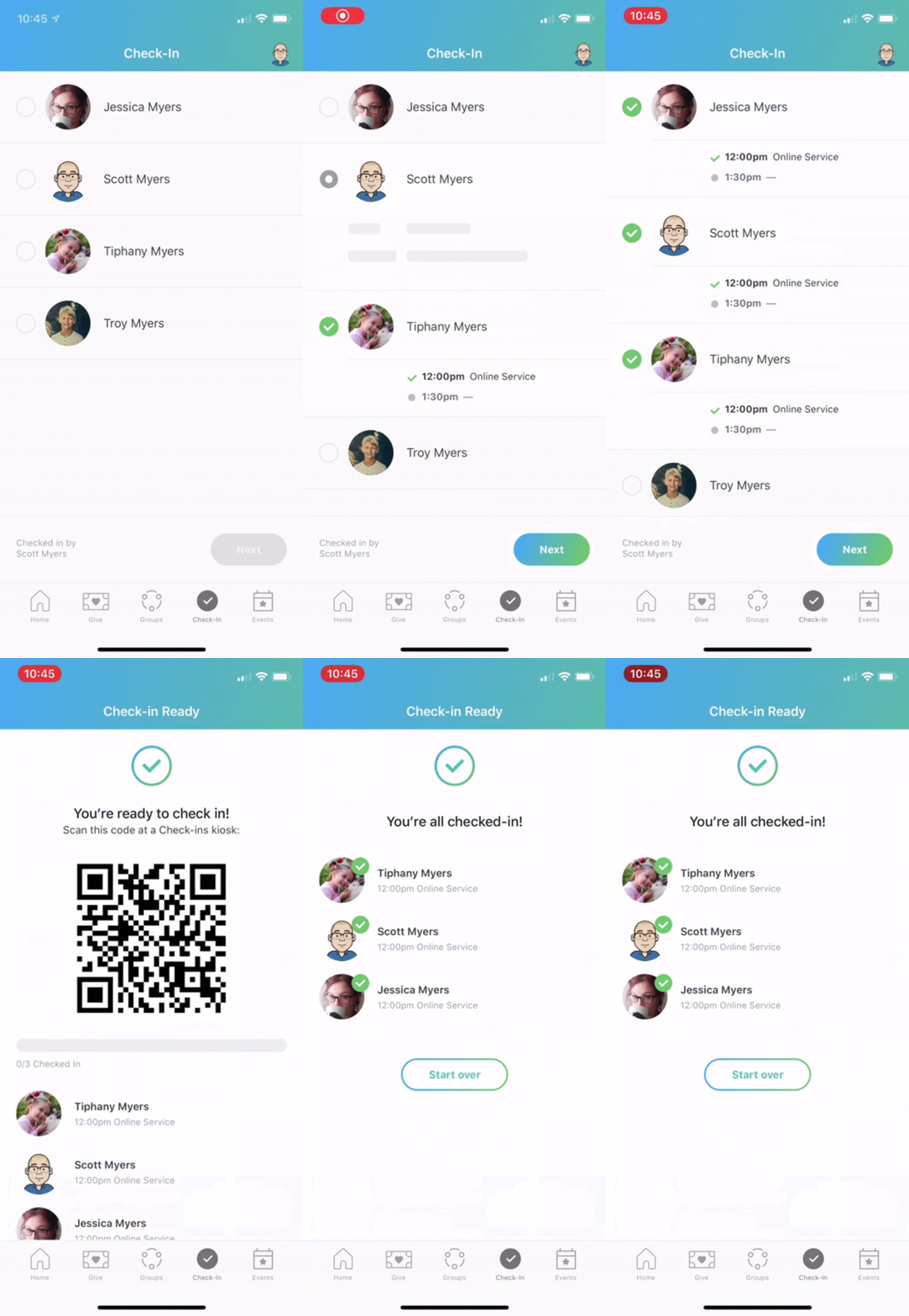
Self check-in opens around 15-30 minutes prior to the event taking place, depending on the event. Open the Church Center app and follow the following instructions to register your attendance:
1. Tap the "Check-in" icon on the bottom right.
2. Follow the steps shown in the animated image below:
Those who are registered as part of a household are able to register their attendance for themselves and their entire family.
If you wish to take advantage of the household feature, to make check-in's easier. Please contact the church office and one of our friendly team will help you to make this possible.

WHAT CAN I DO IN CHURCH CENTER?
Church Center can be used for all of the following and more:
- Add a personal photo to your profile (please use a real picture of yourself. It really helps to create community)
- Check-in your attendance at our online events such as Sunday Online Church Services, Friday Worship Together and other online events
- Join a Life Group or other Ministry Team
- Stay connected and engaged with your Life Group and Ministry Teams
- Update your personal details such as Email, Phone Number and Address
- See other details relating to your Antioch Church Campus schedule

Add your
PROFILE PHOTO
Church Check-in photos help the church leadership connect your face with your name, get to know you and make you feel even more welcome as part of the Antioch Family.

